Saturday, September 18, 2004
URL--Auto Complete
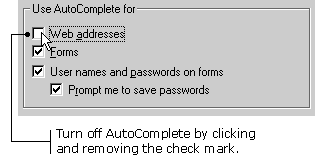
E5 keeps track of Web sites you've visited, so you don't have to type in the entire URL every time. If you want to return to a site you've seen before, you can type part of the URL and AutoComplete will give you a list of possible matches from sites you've visited before. To visit a Web site using AutoComplete: 1) Begin typing the URL into the Address bar. As you type, AutoComplete lists possible matches in a drop-down box under the Address bar.
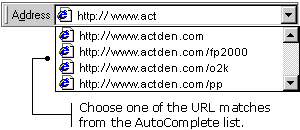 2) Click one of the URL matches to go to the Web site you want to see. You can also turn off the AutoComplete setting. To turn off the AutoComplete setting: 1) Click Tools on the Menu bar, and then choose Internet Options. The Internet Options dialog box appears.
|
|
|